
From the notebook to the digital appointment calendar, one appointment at a time
You don't have to copy years of notebooks before starting. Start with upcoming appointments, configure the most frequent services, and use the free general Saloria appointment calendar to organize a first day of work.
Free with no expiration. No credit card required. One device. Includes 10 AI consultations a month with 5 simulations.
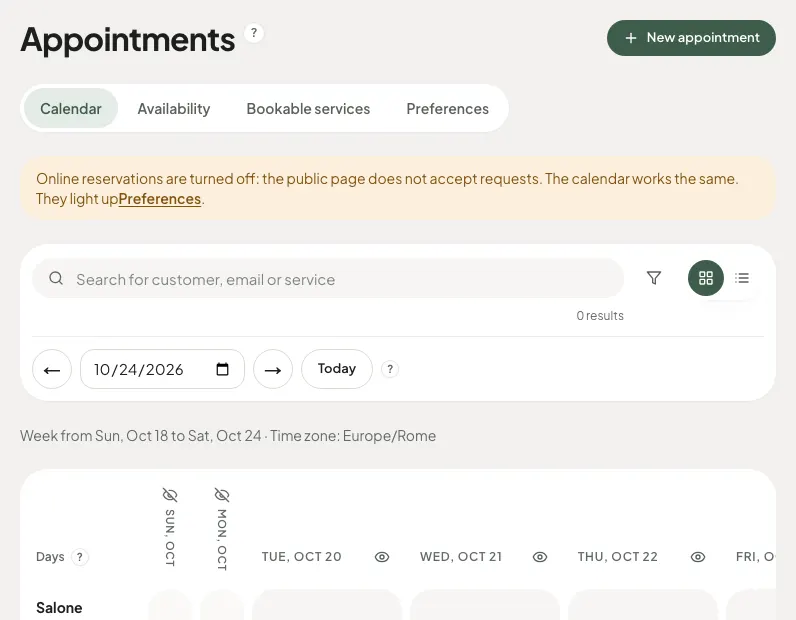
Choose a date from which the calendar becomes the reference
Establish a starting day and enter the future appointments necessary to work. Keep the notebook according to the salon's needs, but clarify where to record new changes. Having two appointment calendars updated differently can create more confusion than paper.
Transform habits into services with a duration
In the notebook, you might only write a name. In the digital calendar, link the client to the service and choose a realistic duration. Start with a few clear items, like haircut and blow-dry, instead of immediately creating a complex price list that no one in the salon actually uses.
Enter a few clients, with correct data
Add people who already have an appointment and search for the record before creating a new one. Check contact details and collect only useful information. It is not necessary to transfer all historical notes, especially if they are no longer updated or concern data that does not need to be kept.
Internal use first, then public bookings
Check a day in the appointment calendar from the device you will use in the salon. Verify hours and closures and try moving an appointment. Activate the public channel only when services and availability correspond to your actual work.
A simple start, without promised automations
The free subscription tier uses the general appointment calendar on one device. Transcribing paper is a salon task: Saloria does not automatically read notebooks and does not promise universal import from other management software. For individual appointment calendars, consider the Basic plan.
How to get started
- Choose the start date of the new appointment calendar.
- Configure the most used services with the correct durations.
- Enter future appointments and verify clients.
- Test the calendar before enabling online bookings.
Discover Saloria features
Learn more with the guides
Frequently asked questions
Do I have to copy the whole notebook?
You can start with future appointments and clients necessary for current work. Evaluate separately which historical information to keep.
Can Saloria read a photo of the paper appointment calendar?
A function that recognizes and automatically transfers notebook pages is not included.
Can I start without having people book online?
Yes. You can prepare the internal appointment calendar first and activate the public path when the configuration is ready.
Is a credit card required?
The free subscription tier does not require a credit card and does not expire.
Saloria Editorial Team. Offer verified on October 24, 2026. The information does not guarantee economic or aesthetic results.